More leads
The Website AI Agent helps visitors understand your services, ask better questions, and move toward calling, booking, or requesting a quote.
Apex Blue builds exceptionally fast websites that are easy to improve—and can grow into a custom AI agent when your company is ready. Start with a website-only build from $4,000, a WordPress Performance Build from $5,000, or a dedicated company AI agent installation from $15,000.
The Website AI Agent helps visitors understand your services, ask better questions, and move toward calling, booking, or requesting a quote.
Routine updates, drafts, forms, and reports stop pulling your team away from selling and serving customers.
Apex Blue applies decades of website, search, paid-media, and automation experience so your team receives a useful system without wrestling with tools.
Fast pages, clear structure, useful content, and quick landing-page updates help your marketing work harder.
Your Website AI Agent, working every day.
A fast website, clear offers, and an Apex Blue-designed agent helping with routine work in the background.
Lead inbox
Ask the Website AI Agent
Add a summer maintenance special to the homepage.
Done. Ready to review.
Site speed
Fast
Built clean
Google visibility
Growing
Pages and content
Weekly report
Ready
Leads and tasks
Choose Your Starting Point
You do not need to understand every model, agent, or automation tool before you call. Tell us the result you want, and Apex Blue will help you choose the smallest serious solution that can produce it.
Start with an exceptionally fast, conversion-focused website your company can own and improve. Add a dedicated AI agent only when it creates enough business value.
Compare website options →Build a company-specific agent around your approved knowledge, lead flow, reporting, customer questions, internal work, or connected business systems.
Explore AI development →Apex Blue can evaluate your company, select the right OpenAI and local tools, set up the workstation, define permissions, train your team, and give the system a useful first job.
Start with the $899 session →They may look fine, and the owner may have tried a few AI tools already, but most websites still leave the business waiting, chasing updates, and missing revenue opportunities.
They show information, but they do not help answer questions, follow up, update content, or move a customer closer to calling.
WordPress itself is not automatically the problem. Unmanaged plugins, slow publishing, weak technical ownership, and agency bottlenecks can turn a capable site into an operational burden.
Need a new page, promotion, or content update? Many businesses still have to email an agency, wait for a ticket, and hope the change is right.
A slow site can hurt Google visibility, ad performance, conversion rates, and customer trust.
What Makes Apex Blue Different
The $4,000 website stays focused on speed, conversion, technical SEO, and easy approved updates. When an agent can create enough value, the $15,000 and $30,000 installation paths add the dedicated AI system, approved knowledge, workflows, hardware, training, and support.
Every agent is shaped around the company’s customers, offers, content, forms, approvals, and day-to-day work—not a generic model demo.
Your agent is built around your services, pages, forms, customers, updates, and daily workflows.
Need a new service page, promotion, blog draft, or offer change? Ask for it in plain English.
The build starts with leads, speed, Google performance, sales follow-up, and time saved.
What It Can Help With
Apex Blue starts with the work, the people, and the desired result. AI accelerates repeatable tasks while your team retains authority over the decisions that affect customers, revenue, and reputation.
Answer routine customer questions
Surface important inquiries
Watch contact forms
Draft service pages and posts
Spot Google visibility opportunities
Spot competitor gaps
Monitor social activity
Create simple reports
Organize business information
Website and AI Agent Packages
Every engagement is reviewed case by case. Your company can begin with a high-performance website, keep WordPress when it is the right foundation, or install a dedicated AI system with company-owned hardware and practical support.

AI-Ready Website
Best when your company needs an exceptionally fast, modern website now and wants the option to add a more capable AI agent later.

Company AI Agent Installation
Best when your company wants the website plus a dedicated AI workstation, current OpenAI-powered development, practical workflows, training, and support.

Advanced AI Operating System
Best for a company that needs deeper integrations, multiple workflows, more memory or concurrency, and a higher-touch rollout across the business.
Managed Operations
If you do not want to own and operate the hardware, Apex Blue can run the platform with you as an ongoing operations partner—not simply host it.
Partnership starts at
$40,000/mo
Includes an expert operating team, continuous automation building, infrastructure management, and ongoing support.
No templates. No one-size-fits-all solution. A roofing company operates differently than a law firm. A law firm operates differently than a home services company. Each deployment is shaped around your workflows and goals.
Prefer WordPress?
WordPress can still be powerful when it is built lean and actively operated. Apex Blue can build or improve your WordPress site, then help your company stand out with ongoing content, technical SEO, performance, security, conversion improvements, and faster publishing.
Explore ongoing WordPress growth management →2026 Apple Silicon Options
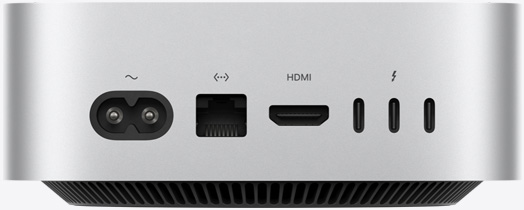
Apex Blue evaluates workload, memory, privacy, concurrency, existing tools, and support needs before recommending hardware. OpenAI models run through approved cloud services; the local Mac gives your company a dedicated place for files, tools, orchestration, browser and app work, scheduled tasks, and selected local models.
Focused always-on workflows
A compact company-owned workstation for website operations, approved files, scheduled work, browser and app tasks, and disciplined day-to-day agent use.
Up to 32GB unified memory
Heavier teams and concurrent workflows
The bridge for companies that need more memory, more simultaneous work, heavier local tools, or a broader set of connected operating tasks.
Up to 64GB unified memory

High-memory and enterprise workloads
Selected when large datasets, demanding media work, higher local-model capacity, or substantial concurrency make a workstation-class system the better fit.
Up to 128GB or 512GB unified memory
Future Ready
Most businesses are still operating with websites built for an older internet. The next generation of websites will use AI agents to answer questions, assist customers, help teams move faster, watch for opportunities, and adapt quickly.
Positioning Statement
We are not selling a chatbot. We are engineering a founder-led website operating system with a custom AI Agent built around the business.
Questions Owners Ask
The offer is meant to be easy to understand: a founder-led custom website, a company-specific AI Agent, practical business support, ownership of the workstation when hardware is included, and a clearer path for updates after launch.
You can—and if the site has useful equity, keeping it may be the smartest move. Apex Blue WordPress Performance Builds start at $5,000. We can also manage content, technical SEO, security, speed, and ongoing improvements so your company gets more from the platform.
No. The goal is to help your team spend less time on repetitive work and more time on valuable customer, sales, and operations work.
No. If you can send a text message, you can use the system. The technical layer stays behind the scenes.
Apex Blue starts with the business job, the website, the people involved, and the result worth improving. OpenAI is our preferred agentic development stack when it offers the right capability, reliability, speed, and cost. We test current models for the approved workflow, then maintain the company-specific instructions, permissions, and connections that make the system useful as the technology evolves.
Most AI tools sit outside the places where money is won or lost. This is connected to the website, lead flow, content updates, speed, Google performance, and daily work that affects sales.
Apex Blue provides onboarding, training, and 60 days of support. After that, ongoing support plans are available, or Apex Blue can operate the platform through a Fully Managed AI Operations Partnership.
The written scope identifies the hardware, website or repository handoff, domains, advertiser and analytics accounts, approved business data, and company-specific configuration delivered to your company. Third-party software, cloud services, APIs, and model access remain subject to their own licenses, subscriptions, and usage charges.
Start with the AI-Ready Website from $4,000, choose a cloud-supported custom build, or use a managed engagement. Hardware is recommended only when it improves ownership, reliability, privacy, local capability, or day-to-day operations.
No. A roofing company, law firm, and home services company all sell, follow up, and update differently. The deployment is shaped around your services, team, website needs, content process, and growth goals.
Tell us what kind of business you run, what your current website cannot do, and where you want a better operating system to save time, cut costs, and help win more revenue.